
Body-controlled interactive games
Players use their bodies to operate physical buttons while balancing on a control platform. A visible game display turns movement and coordination into a shared indoor challenge.
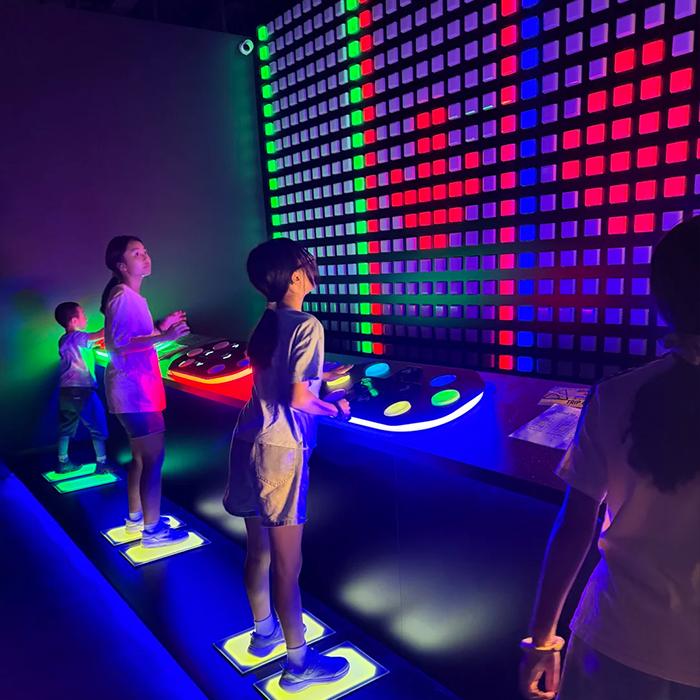
Example from the product handbook. Final room, equipment and safety requirements are project-specific.
How the experience works
The player stands at a control station and uses body movements to press the controls, responding to the game shown on the display. The handbook describes team and competitive formats with coordination, colour and navigation challenges. Ask for a demonstration of the current content and how each control affects the game before selecting your station layout.
Where it can fit
Consider an active-game room in a family entertainment centre, an indoor leisure venue or a complementary zone within a larger challenge concept. This format can offer a different interaction from moving across an LED floor or touching a reaction wall. Match control reach, platform access and briefing to the proposed audience.
Before you specify the room
Send the room plan, ceiling height, doors, station arrangement and intended group size. Identify power and network routes, display sightlines and access for maintenance. Review platform dimensions, stability, surface grip, approach and exit space, staff supervision and accessible alternatives with the technical team. Final equipment and safety requirements are project-specific.
The interaction is physical control
The source image and text show control platforms, physical buttons and a game display. This is not evidence of a camera-only motion-tracking installation or an included virtual-reality headset. The proposal should identify the stations, controls, display, software, connections and selected content actually supplied. If camera tracking or additional sensors are requested, review them as a separate requirement.
Content and licensing belong in the scope
Discuss the game mechanics and the current mode catalogue with the supplier. Agree on content availability, permitted use in a commercial venue, update terms and supported languages. The public page does not promise a particular third-party game or licensed character. Request the applicable content and licence terms for the exact configuration you are purchasing.
Prepare a station and operation brief
Describe how players will rotate between stations, receive instructions and compare results. Include new-build or refurbishment status, country, planned opening and any connection to other game rooms. Ask for an operator trial covering start, pause, reset and fault handling, then define commissioning, training and ongoing support in the proposal.
Questions before you buy
Is this camera-based motion control?
The handbook describes body-operated buttons on a control platform. A camera system is not established by that description. Confirm the actual input hardware in the proposed configuration.
Can players compete or cooperate?
The handbook lists both team and competitive formats. The available modes, station count and simultaneous player capacity must be confirmed for the selected system; they are not fixed by the room photograph.
Is the 6 × 4 m room a required specification?
It is an illustrative handbook footprint of approximately 24 m². Review station spacing, display placement, access, waiting and maintenance before agreeing on the finished room.
What should I request in the software proposal?
Ask for the exact game list, operator controls, supported languages, content update and licence terms, connectivity needs and any session records. Integration with booking or payment is a separate scope to confirm.
Choose your project scale
Starter can focus on a defined control-platform experience. Pro combines complementary game rooms and shared operation; Flagship considers the full venue. Agree on station count, content and software before pricing.
Product information: CYDON product handbook, page 12. Reviewed 1 October 2026.