Family entertainment center games for FEC upgrades
CYDON supplies interactive entertainment equipment for family entertainment centers, including LED interactive floors and complementary active-play rooms. Use this page to decide whether to add one experience, rework a zone, or coordinate several rooms—before you lock equipment or site work. Prepare a retained-attraction list, room constraints, and software interfaces; then request an itemised proposal covering hardware, content rights, installation responsibilities, and support. Configurations, capacity, and commercial terms are project-specific and confirmed in your quotation—not by a catalogue photo.
CYDON GAMES · Buyer planning brief · Reviewed 3 October 2026
Keep, replace or add: define the change first
List each existing attraction and mark it keep, replace or review. Note the audience it serves, its occupied area, staff tasks and entry/exit routes. Identify what the new zone should contribute: a different player action, a bookable group activity or a defined change to the visitor journey. Use your own attendance, queue and operating observations to test that objective; a new game does not establish demand or a revenue uplift. This page addresses an operating centre's upgrade. Use the venue-planning guide for a new-site layout and the equipment guide for the wider catalogue.
Compare three upgrade paths
These are alternatives for a project brief, not fixed bundles or promises of cost, fit or installation time. Ask for a drawing and itemised scope for the option you select.
Upgrade path
What the brief should cover
Resolve before ordering
Add one separate experience
Retain the current attractions and define the proposed game area, its entry, briefing, supervision and reset routine. A focused Starter discussion can compare that one addition.
Check usable space, neighbouring activities, services, maintenance access and whether the new game operates independently. Shared booking or scoring needs explicit confirmation.
Replace or rework a defined zone
Identify exactly what is removed, retained and added. Record the finished room condition, the route for equipment delivery and the temporary visitor route while work is underway.
Separate removal and room preparation from equipment supply. Confirm existing items that can be reused after review, site-work responsibility and the reopening acceptance checks.
Coordinate several interactive rooms
Specify the retained attractions, selected room mix and complete visitor journey. Discuss a Pro multi-zone scope or a wider Flagship venue brief according to the actual change.
Review shared staff, queues, slowest-room timing, unavailable-room recovery and the written software scope. More rooms alone do not establish capacity, repeat visits or a common control system.
On a small screen, scroll the comparison sideways. Keyboard users can focus the comparison and use the arrow keys.
Choose a different player action, then test the fit
Compare what each proposed game asks players to do with the activities you already offer. These three documented handbook formats illustrate different actions. They are examples to review, not a recommended bundle or a complete list of currently supplied modes.
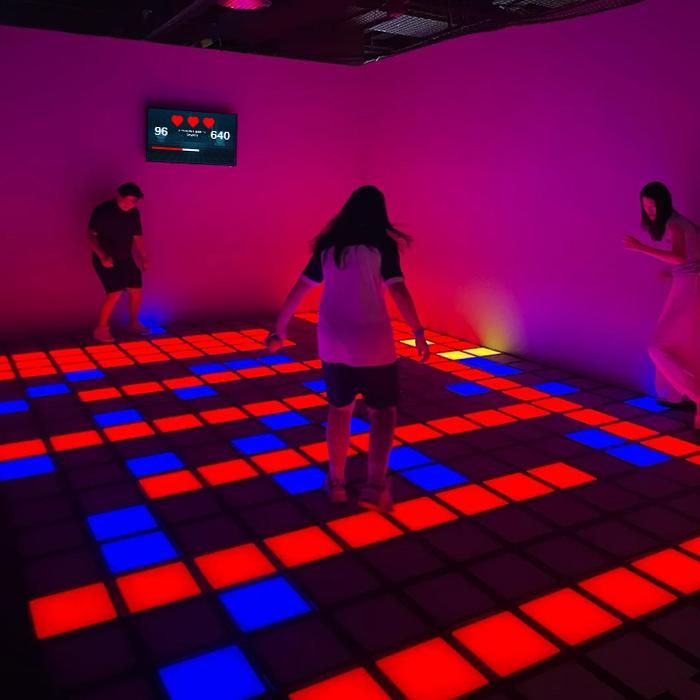
The illustrated GRID room uses pressure-sensitive illuminated tiles with safe green tiles, blue targets and red game hazards.
For an existing room, ask how the proposed floor build-up, cable routing, edges and replaceable-module access fit the finished floor and adjacent circulation. Obtain a reviewed layout before treating the room as suitable.
The handbook describes shooting at hoops identified by illuminated colours and patterns, including sequence or question-based challenges.
Compare this aiming activity with the rest of your venue. Ask for the proposed shooting area, ball containment, collection routine and separation from neighbouring guests; confirm the intended audience and supervision for that configuration.
The illustrated control-platform format asks players to balance and use physical buttons to control the selected game.
Review platform access, player movement, visibility and the operator's start/reset routine. Request the exact content catalogue and commercial licence for the proposed configuration; the illustration does not establish third-party game rights or compatibility with retained equipment.
Plan the work around a real operating schedule
Mark the areas that must remain open, work access, deliveries, storage and visitor routes on the existing plan. Ask who surveys the room, removes old equipment, prepares services and finishes, installs, commissions and trains staff. Have the responsible site professionals review the work and retained public routes. A supplier should state the prerequisites, responsible party and acceptance check for each phase.
Request a schedule based on the reviewed site and selected configuration, including shipping, local work and testing. Confirm which areas close and when they can reopen; this page does not promise installation without downtime. Before reopening the new zone, run the complete proposed session with your operator: briefing, entry, play, exit, reset and cleaning. Record demonstrated functions and unresolved items in the handover record.
Separate new software from retained systems
Decide whether the new experience is independently operated or part of a proposed shared journey. Write down the game start/reset controls, modes, languages, staff access and records you require. If you retain a booking, payment, membership or scoring system, identify its provider and the specific connection you want. Ask whether that interface is demonstrated and included, requires separate work or remains unconfirmed. Do not infer compatibility, a shared player identity or an included payment integration from a connected-venue description.
Compare proposals against the same retained-equipment list and site plan. Separate equipment and selected content, software and any interface work, removal, room preparation, delivery, duties, installation, commissioning, training and spare parts. Mark each line included, excluded or unconfirmed, then ask for licence, update, warranty and support terms. Use your own operating and downtime assumptions when comparing the investment; request a relevant, permissioned project reference rather than inferring outcomes from a coverage map.
Questions before upgrading your centre
Can I add one interactive game without replacing my existing attractions?
That is one project option to review. Identify the retained attractions and a separate proposed area, then check usable space, services, entry, supervision, reset and maintenance. Whether the game operates independently or needs connections to your existing systems must be confirmed for the selected configuration; this page does not approve the site.
Can installation happen while the family entertainment centre stays open?
Request a phased plan for the actual building, selected equipment and operating schedule. Mark work access, closed areas and retained visitor routes, and have the responsible site professionals review them. Agree prerequisites and reopening acceptance checks. Continuous operation or zero downtime is not promised.
Will CYDON games work with my current booking or payment system?
Do not assume an existing integration. Identify the provider and connection required, then ask for the proposed version, a demonstration and written responsibilities. The quotation should state whether the interface is included, separate work or unconfirmed. Review software scope before selecting a shared visitor journey.
What should an interactive entertainment venue upgrade quotation include beyond the games?
Use the same site plan and retained-equipment list to compare equipment, selected content, software/interface work, removal, room preparation, shipping, duties, installation, commissioning, training and spare parts. Require included/excluded/unconfirmed labels and written licence, update, warranty and support terms. Prices and delivery windows follow the reviewed scope, not a fixed package on this page.
Send an upgrade brief, even before the design is final
Use the existing project form. Describe what stays, what changes and which assumptions still need review. A Starter, Pro or Flagship choice is editable project scope, not a purchase or fixed package.
Country/city, current venue type, intended visitors and the upgrade objective.
Game-mechanic examples: CYDON product handbook, pages 9, 12 and 14. Upgrade paths and checklists are buyer planning questions, not evidence of a delivered retrofit, approved site or guaranteed integration. Current configuration and commercial terms require project confirmation.
Define the party promise before choosing the game mix
For birthday and group packages, record the reserved celebration space, included game areas, activity timing and guest rules as separate decisions. Use the interactive venue party-package planning guide to prepare that operating brief.
Turn the selected game mix into an opening-day list
A catalogue reference is not a confirmed purchase line. Separate rooms, games, event packages and time-sensitive availability, then record the exact equipment, content, software, installation and acceptance evidence needed for opening day. Use the opening-day purchase-list guide to keep those decisions traceable.